
We are trying a live chat on the Bluesky platform. For directions on creating an account and getting started with Bluesky, check out this resource.
Once you have created your account on Bluesky… It’s time for the chat (usually 8 PM Eastern on the 2nd and 4th Tuesdays of the month).
At 8:00, go to Bluesky and search for #KyLChat and click on Latest. This will show you the most recent posts.
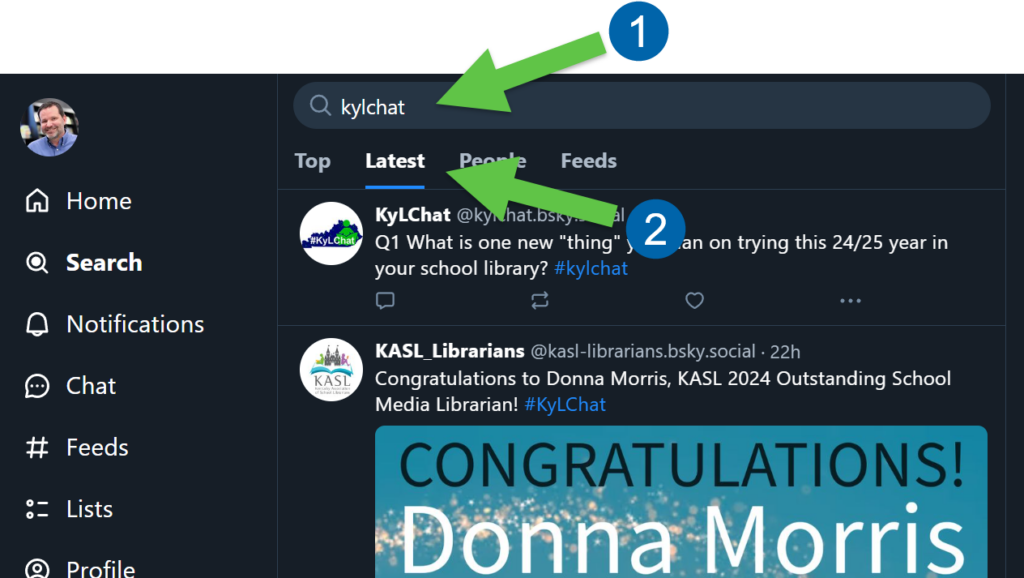
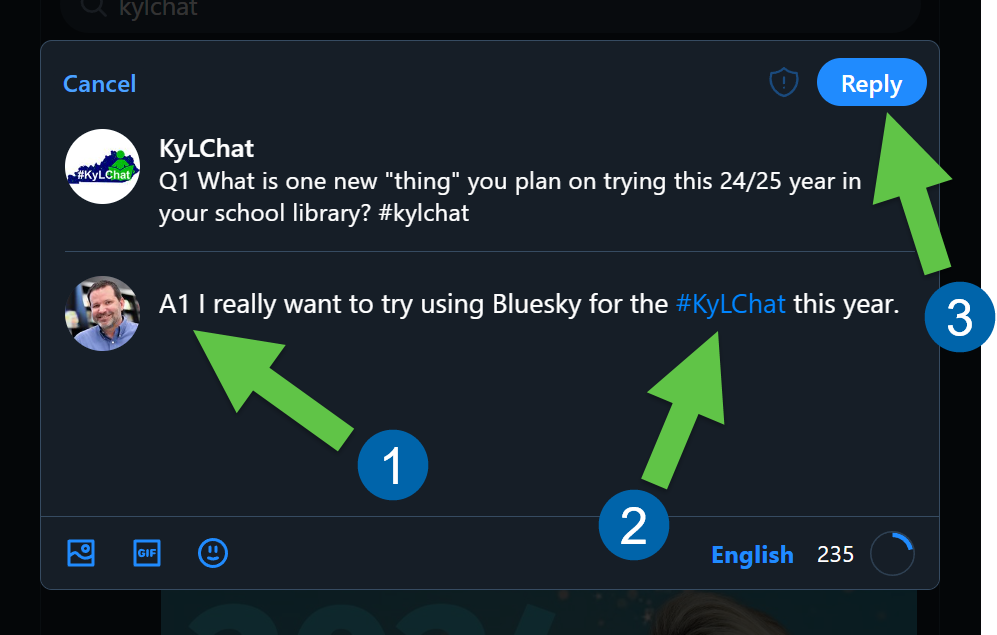
The questions will start with the letter “Q” and the number of the question. Now, this is the important part. You will answer with the letter “A” and the question number AND include #KyLChat in your message. For this example I could respond by clicking the reply button there on the message, or starting a new post with the following:

A1 I really want to try using Bluesky for the #KyLChat this year.
The tag, #KyLChat, doesn’t necessarily have to be at the end of your message, but it can be. Just make sure it is there. This is what allows the other participants of the chat to see your contributions to the conversation.
Type A1, A2, etc.. then your post, make sure to include #KyLChat, and then click the Reply button.
That’s it! Now, you will return to the search for #KyLChat, and make sure to click “Latest” to see replies and comments from all of the participants.